
 Home Page
 Windows
 Android
 MacOS
MacOS Linux
Linux WEB
WEB
Topaz Studio 2 is the evolution of Topaz Studio, a creative photo editing software. In this new version, Topaz introduces AI so you can edit your images in a fast and creative way using effects, advanced masking, and non-destructive layers. Topaz Studio 2 includes two editing workflows, one with looks that work as presets and the other with filters.
Topaz Studio 2 can also be used as a plugin for Photoshop and Lightroom, expanding the creative possibilities in your editing workflow. Topaz Studio 2 is one of the most user-friendly pieces of software you can find. If you have trouble using more complex photo tools like Photoshop, you’ll find that everything from the interface to the workflow is more intuitive and straightforward in Topaz Studio 2.
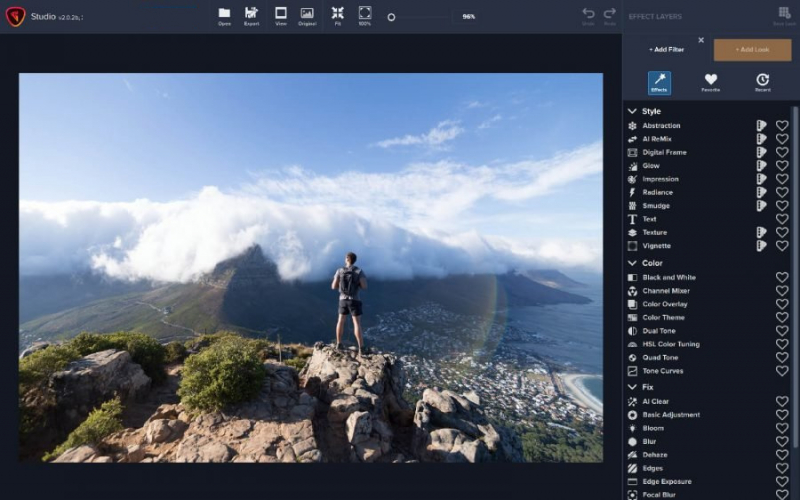
HOW TOPAZ STUDIO 2 WORKS
- Importing files: Topaz Studio 2 supports .png, .tiff, .jpeg, and also the most common types of RAW files. To open a photo, simply drag or open your file.
- Use the generic tools Heal and Crop to straighten and clean your photos.
- Add “Filters” or “Looks” to edit and add creative effects to your images.
- Use as many adjustments as you need with non-destructive layers.
- Adjust your photos selectively using the powerful masking tool.
- Keep in mind that you can only edit one photo at a time, so batch processing is not supported.
- Export your edited photos: Click on export or go to File > Export to export your image. Don’t forget to change the output settings as you wish. You can also save your project and continue working later.
Features of Topaz Studio
Cutting edge filters:
- Most image editor tools are the same: your Exposure in one editor is the same Exposure in another. In Studio, we’ve thought about what common adjustments would look like if they were designed today, and updated them to their most modern and useful forms.
Powerful selection and masking:
- Very rarely do you want to apply the same effect to all parts of your image the same. Studio considers masking and selective adjustments to be a core task, and features several innovations that make selective editing substantially easier and faster for you.
Fully non-destructive layers:
- Mix and match filters and effects with different blending modes and opacity. Everything that you do in Studio can be edited and adjusted after the fact with a fully non-destructive layer workflow.
System Requirements:
- Supported OS: Windows 7/ Windows 8/ Windows 8.1/ Windows 10 (64 bit)
- Free Hard Disk Space: 2 GB or more.


